Building an App with WordPress’ REST API
Wordcamp Boston 2017
About Me

Greg Opperman
Twitter: @gopperman
Github: also @gopperman
Check Me Out

This talk is open-source!
Let's take a quick poll
Why?
It does what it does extremely well...
- Content Management
- Custom Fields
- Taxonomy
- Authentication & Security
HOWEVER
WordPress doesn't provide a lot of help for frontend development
Use the WP REST API if:
- You need to create a rich, interactive experience
- Your website is action-oriented and stateful, not purely content-driven
- You'd like to release your app on multiple platforms
- Most of your website is a basic blog or website, except...
Let's look at some examples
WordPress.com: Calypso
The New York Times uses the WP REST API to power their live coverage blogs, with Backbone and React.
Architectural Approaches
Option 1: Integrate your app directly in a theme
Pros:
- Take advantage of WordPress' theme features, a la carte
- Can hybridize standard content-driven pages with more interactive experiences
Cons:
- Not appropriate for large, complex apps
- Who's responsible for what? (e.g. routing)
If you want to do this, I made a small theme that will help you
Option 2: Create a Standalone App
Pros:
- Loosely coupled
- Isomorphic rendering and other optimizations
- Host your app anywhere
Cons:
- Potential cross-origin and authentication problems
The WordPress REST API
/wp-json/wp-json/v2/posts?search=dance
[
  {
    "_links": {
      "about": [
        {
          "href": "http://breedtv.com/wp-json/wp/v2/types/post"
        }
      ],
      "author": [
        {
          "embeddable": true,
          "href": "http://breedtv.com/wp-json/wp/v2/users/2"
        }
      ],
      "collection": [
        {
          "href": "http://breedtv.com/wp-json/wp/v2/posts"
        }
      ],
      "curies": [
        {
          "href": "https://api.w.org/{rel}",
          "name": "wp",
          "templated": true
        }
      ],
      "replies": [
        {
          "embeddable": true,
          "href": "http://breedtv.com/wp-json/wp/v2/comments?post=5864"
        }
      ],
      "self": [
        {
          "href": "http://breedtv.com/wp-json/wp/v2/posts/5864"
        }
      ],
      "version-history": [
        {
          "href": "http://breedtv.com/wp-json/wp/v2/posts/5864/revisions"
        }
      ],
      "wp:attachment": [
        {
          "href": "http://breedtv.com/wp-json/wp/v2/media?parent=5864"
        }
      ],
      "wp:term": [
        {
          "embeddable": true,
          "href": "http://breedtv.com/wp-json/wp/v2/categories?post=5864",
          "taxonomy": "category"
        },
        {
          "embeddable": true,
          "href": "http://breedtv.com/wp-json/wp/v2/tags?post=5864",
          "taxonomy": "post_tag"
        }
      ]
    },
    "author": 2,
    "categories": [
      2,
      6
    ],
    "comment_status": "closed",
    "content": {
      "protected": false,
      "rendered": ""
    },
    "date": "2016-08-16T03:42:13",
    "date_gmt": "2016-08-16T03:42:13",
    "excerpt": {
      "protected": false,
      "rendered": ""
    },
    "featured_media": 0,
    "format": "standard",
    "guid": {
      "rendered": "http://breedtv.com/?p=5864"
    },
    "id": 5864,
    "link": "http://breedtv.com/christopher-walken-dance-now/",
    "meta": [],
    "modified": "2016-08-16T03:42:13",
    "modified_gmt": "2016-08-16T03:42:13",
    "ping_status": "closed",
    "slug": "christopher-walken-dance-now",
    "status": "publish",
    "sticky": false,
    "tags": [
      629,
      861,
      287
    ],
    "template": "",
    "title": {
      "rendered": "Christopher Walken Dance Now"
    },
    "type": "post",
    "video_url": "https://vimeo.com/90407771"
  },
  ...
]
Adding Custom Fields
// functions.php
function my_rest_prepare_post( $data, $post, $request ) {
  $_data = $data->data;
  $_data['URL'] = get_post_meta( $post->ID, 'URL', true );
  $data->data = $_data;
  return $data;
}
add_filter( 'rest_prepare_post', 'my_rest_prepare_post', 10, 3 );
Custom Endpoints
/**
 * Grab random posts
 *
 * @param array $data Options for the function.
 * @return array|null a collection of randon posts,  * or null if none.
 */
function get_random_posts( $data ) {
  $posts = get_posts( array(
    'post_type' => 'post',
    'posts_per_page' => $data['num'],
    'orderby' => 'rand',
  ) );

  if ( empty( $posts ) ) {
    return null;
  }

  return $posts;
}
add_action( 'rest_api_init', function () {
  register_rest_route( 'btv/v1', '/random/(?P\d+)', array(
    'methods' => 'GET',
    'callback' => 'get_random_posts',
  ) );
} );
	[
		{
			"ID": 257,
			"post_author": "2",
			"post_date": "2013-08-13 02:11:40",
			"post_date_gmt": "2013-08-13 02:11:40",
			"post_content": "",
			"post_title": "Let's Paint a Lion, Exercise, and Play Chess TV",
			"post_excerpt": "",
			"post_status": "publish",
			"comment_status": "closed",
			"ping_status": "open",
			"post_password": "",
			"post_name": "lets-paint-a-lion-exercise-and-play-chess-tv",
			"to_ping": "",
			"pinged": "",
			"post_modified": "2014-08-09 19:08:06",
			"post_modified_gmt": "2014-08-09 19:08:06",
			"post_content_filtered": "",
			"post_parent": 0,
			"guid": "http://breedtv.gopperman.com/?p=257",
			"menu_order": 0,
			"post_type": "post",
			"post_mime_type": "",
			"comment_count": "0",
			"filter": "raw"
		},
		...
	]
Ideally, we'd want to edit the data returned by the API to include everything we need, no more or no less, in one response:
	[
	  {
	    "src": "youtube",
	    "id": "IdsKs4lvuBE",
	    "title": "pathways",
	    "slug": "pathways",
	    "tags": [
	      {
	        "name": "animation",
	        "slug": "animation"
	      },
	      {
	        "name": "Cool 3D World",
	        "slug": "cool-3d-world"
	      },
	      {
	        "name": "shorts",
	        "slug": "shorts-2"
	      }
	    ]
	  },
	  {
	    "src": "youtube",
	    "id": "1JFXHs_Efe8",
	    "title": "Stewart Lee “Rap Singers”",
	    "slug": "stewart-lee-rap-singers",
	    "tags": [
	      {
	        "name": "comedy",
	        "slug": "comedy-2"
	      }
	    ]
	  },
	  ...
	]
React Basics
Powerful ES6 Features, like Fetch and Promises
const requestUrl = 'http://breedtv.com/wp-json/btv/v1/random/20'

fetch(requestUrl).then((response) => {
	return response.json()
})
.then((data) => {
	this.setState({
		response: data,
	})
})
.catch((err) => {
	// Do error handling
	})
})
Lifecycles
// Play a video after component mounts
componentDidMount() {
	this.playVideo()
}

// If our state changes, re-render the component
shouldComponentUpdate(nextProps, nextState) {
	return !_.isEqual(this.state, nextState)
}
More about lifecycles: here
Easy Templating with JSX and Reusable Components
import React, { Component } from 'react';
import Sidebar from './components/Sidebar.js'
import Video from './components/Video.js'
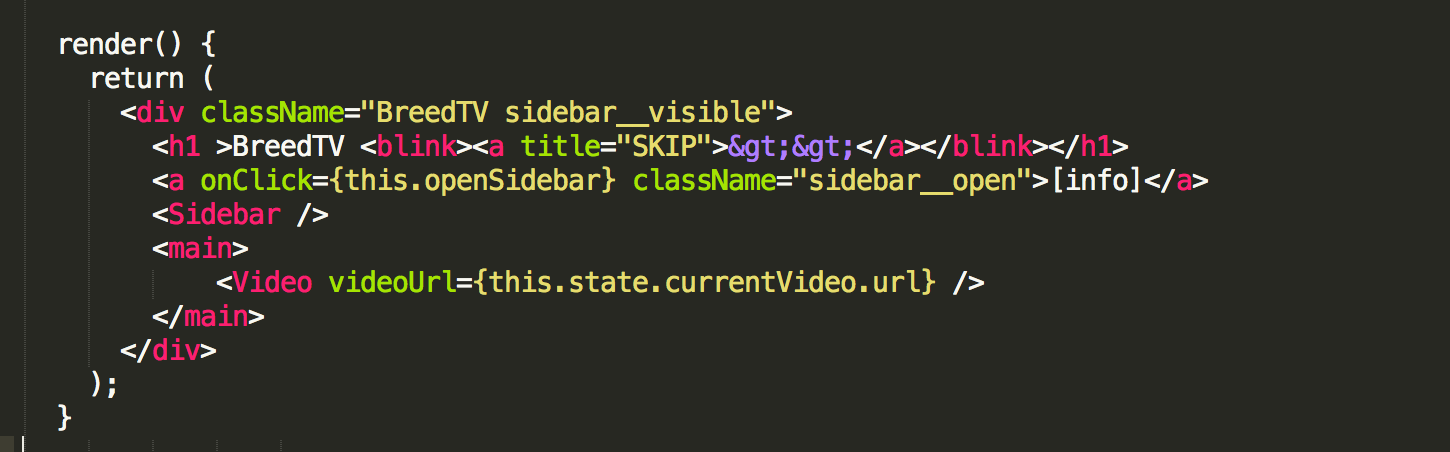
Encourages unidirectional data flow with flux/redux
Components define interface for interacting with their parents...and should only receive the information they need to do their jobs
import React, { Component } from 'react'
import {PropTypes} from 'prop-types'

class Video extends Component {
	...
	render() {
		const { videoUrl } = this.props
		...
	}
}

Video.propTypes = {
	videoUrl: PropTypes.string.isRequired,
}

export default Video